Categories
- Apps
- Best Practices
- Doc Camera
- Online Resources
- STEM
- Tech-Tips
- Technology Integration
Showing posts with label Online Resources. Show all posts
Tuesday, August 25, 2020
Wednesday, April 1, 2020
WRSD Remote Learning Website
The WRSD Remote Learning Website was created to support teachers, students, and parent through the process of online and distant learning.
Saturday, February 29, 2020
Google Certified Educator Toolkits
From ShakeUpLearning.com:
Google Certified Educator Toolkits

ICYMI - Need some help preparing for the Level 1 or Level 2 exam?
Grab my free toolkits! These 3-in-1 downloads will give you a breakdown of the knowledge and skills you need to pass the exam, exam tips, and more!
Friday, January 31, 2020
News Literacy 101 | Common Sense Media
Fact-Checkin' Fake News with
|
Follow these steps to help kids (and you!) resist fake news, fact-check, and think critically about news and information. By Christine Elgersma 3/26/2018
Go to the ARTICLE
Thursday, June 6, 2019
EDU in 90: Chromebook Tricks
EDU in 90: Chromebook Tricks and More are a few videos with useful tips when using Chromebooks, check them out!
Friday, May 31, 2019
Friday, March 29, 2019
Monday, September 18, 2017
ClassroomScreen makes you projected screen "feel" interactive!
Thanks Josh Rawson for sharing this resource!
Project ClassroomScreen on your projector and you can…
- choose a background
- type your instructions in the textbox
- choose a work symbol
- set a timer or show the clock
- use the traffic light
- pick a random name
- do some simple math
- draw in-screen or full-screen
- generate a qr-code
- drag and drop the icons in the right place
Here's how it works...
Maria Pearson
Instructional Technology Specialist
Winnisquam Regional School District
603.286.4531 x1211
My Blog - http://wrsdtechnology.blogspot.com/
Wednesday, August 16, 2017
New Technology Toolbox
Four GREAT resources to engage and sustain your students in almost any type of classroom situation... Take a look at the New Technology Toolbox featured tools:
https://sites.google.com/view/thetechtoolbox/the-technology-toolbox
Let's get together and plan your next lesson with one of these!
Maria
Maria E. Pearson
Instructional Technology Specialist
Winnisquam Regional School District
603.286.4531 x1211
Monday, December 19, 2016
Online, Interactive Whiteboard Math Resources
All Interactive Whiteboard Resources
Can be used from any device, and not just on the IWB... Try them out! (Thanks, Josh Rawson!)
Thursday, April 7, 2016
Turn your Chomebook into a video camera with ClipChamp
Turn your Chomebook into a video camera with ClipChamp, just add it from the Google Web Store:
What's this?
Clipchamp lets you convert, compress and record video files. You can save processed videos or upload them straight to YouTube, Vimeo, Facebook or Google Drive.
Clipchamp app reduces your input video's file size at no visible quality loss - smaller files upload faster and can be shared more easily. Say goodbye to never-ending uploads.
Clipchamp webcam recorder takes video in SD or HD, depending on the type of your webcam and the oomph of your CPU.
Clipchamp app reduces your input video's file size at no visible quality loss - smaller files upload faster and can be shared more easily. Say goodbye to never-ending uploads.
Clipchamp webcam recorder takes video in SD or HD, depending on the type of your webcam and the oomph of your CPU.
How does it work?
Clipchamp runs in your browser but your videos get processed locally on your computer. This means you don't need to install any software or slowly upload files to an online converter. Your videos stay on your computer until you decide to share them.
Clipchamp's preconfigured output settings keep things simple. Output formats are MP4, WebM, FLV (Flash video), WMV (Windows Media) & GIF. Resolution options are 240p, 360p, 480p, 720p, 1080p & "same as input file."
You can access ClipChamp directly from the web at https://clipchamp.com/. If you need help installing or using this tool, let me know...
Clipchamp's preconfigured output settings keep things simple. Output formats are MP4, WebM, FLV (Flash video), WMV (Windows Media) & GIF. Resolution options are 240p, 360p, 480p, 720p, 1080p & "same as input file."
You can access ClipChamp directly from the web at https://clipchamp.com/. If you need help installing or using this tool, let me know...
Maria
Maria E. Pearson
Instructional Technology Specialist
Winnisquam Regional School District
My Blog - http://wrsdtechnology.blogspot.com/
Sunday, December 6, 2015
The Hour of Code is HERE!
We live in a world surrounded by technology. And we know that whatever field our students choose to go into as adults, their ability to succeed will increasingly hinge on understanding how technology works. But only a tiny fraction of us are learning computer science, and less students are studying it than a decade ago.
Our Hour of Code is a statement that WRSD is committed to teaching these 21st century skills. To continue bringing programming activities to students, this week (Dec. 7-13) our WRSD students in grades K through 8 will be participating within their Computer Technology classes, and 9-12 will have the opportunity to explore while in many of their seminar and core classes.
For more details on the Hour of Code go to (https://code.org/) and try it out. Here are some additional websites that students can explore for Hour of Code activities:
- Hour of Code Tutorials (Star Wars, Minecraft, Frozen) - https://code.org/learn
- Google's Made with Code - https://www.madewithcode.com/
- Tynker's Hour of Code - https://www.tynker.com/hour-
of-code/ - Khan Academy’s Hour of Code - https://www.khanacademy.org/
hourofcode - Codecademy’s Hour of Code - https://www.codecademy.com/
courses/hour-of-code-en/0/1 - LightBot Hour of Code http://lightbot.com/hocflash.
html Lightbot for Mobile Devices http://lightbot.com/ - Build with Chrome–kind of like Minecraft, more like Google Earth Warehouse; use virtual Lego blocks to build in your browser https://www.
buildwithchrome.com/
Explore and have fun!
Maria
Maria E. Pearson
Instructional Technology Specialist
Winnisquam Regional School District
My Blog - http://wrsdtechnology. blogspot.com/
Sunday, November 29, 2015
Hour of Code coming soon...
Computers are everywhere, but fewer schools teach computer science than 10 years ago. Good news is, we’re on our way to change this. If you've heard about the Hour of Code before, you might know it made history. More than 100 million students have tried an Hour of Code.
With the Hour of Code, computer science has been on homepages of Google, MSN, Yahoo! and Disney. Over 100 partners joined together to support this movement. Last year, every Apple Store in the world hosted an Hour of Code and even President Obama wrote his first line of code as part of the campaign.
This year, let's make it even bigger. I’m asking you to join in for the Hour of Code 2015. Please get involved with an Hour of Code event during Computer Science Education Week, December 7-13.
Our Hour of Code is a statement that WRSD is ready to teach these foundational 21st century skills. To continue bringing programming activities to students, we want to make our Hour of Code event huge. WRSD students in grades K through 8 will be participating within their Computer Technology classes, and grades 9-12 will have the opportunity to explore while in many of their seminar and core classes.
For more details, go to Hour of Code (http://hourofcode.com/us) to try it out yourself, or why not with your class. Also, take a look at the activities offered by other Hour of Code partners:
- Hour of Code Tutorials (Star Wars, Minecraft, Frozen) - https://code.org/learn
- Google's Made with Code - https://www.madewithcode.com/
- Tynker's Hour of Code - https://www.tynker.com/hour-of-code/
- Khan Academy’s Hour of Code - https://www.khanacademy.org/hourofcode
- Codecademy’s Hour of Code - https://www.codecademy.com/courses/hour-of-code-en/0/1
Explore and Enjoy!
Maria
Maria E. Pearson
Instructional Technology Specialist
Winnisquam Regional School District
My Blog - http://wrsdtechnology. blogspot.com/
Tuesday, August 25, 2015
New Features in Google Classroom...
As many of you know, WRSD is using Google Apps for Education in grades 1
through 12 this year. One of the easiest ways to introduce students to this
integrated environment is through the Google Classroom App. To go through
a tutorial on how to set up your virtual classroom in Google, go to
MPearson@wrsdsau59.org and I can help you get started.
To keep you up to date, I want to share some enhancements to Google
Classroom that were just released earlier this week.
|
|
Posted: 24 Aug 2015 11:51 AM PDT
As teachers gear up for the new school year, we’re adding a number of new features in
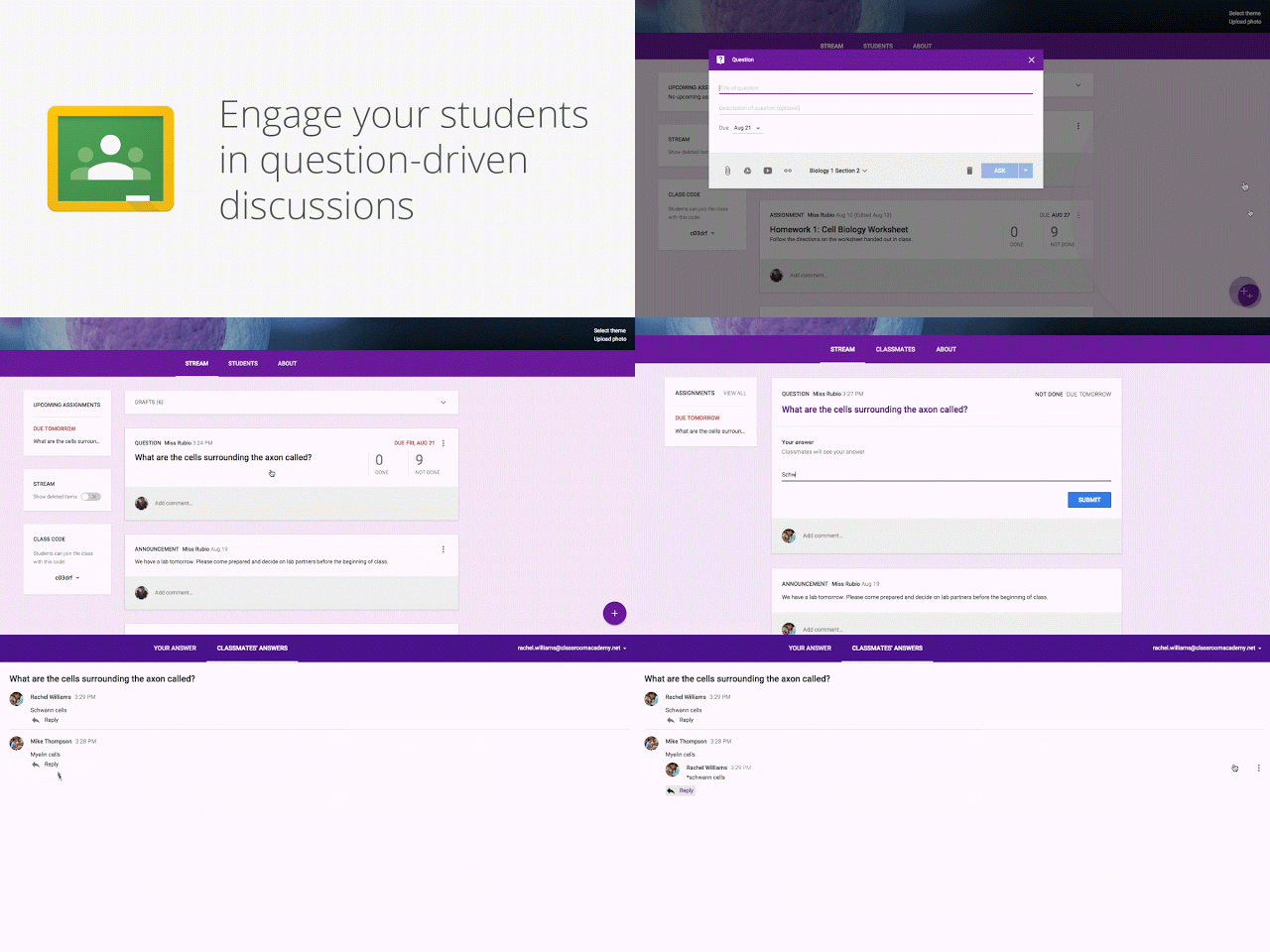
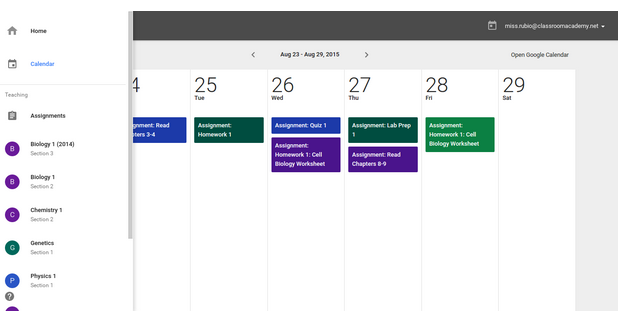
Google Classroom to help them save time, engage with students, and keep everyone organized. Most of these features are rolling out this week, with others coming soon. Keep students engaged with question-driven discussions Since Classroom launched last year, teachers have been using their class stream to host student debates, Q&A, and discussions. Starting today, they’ll be able to do this in a more collaborative way. They can post questions to their class and allow students to have discussions by responding to each other’s answers (or not, depending on the setting chosen). For example, teachers could post a video and ask students to answer a question about it, or post an article and ask them to write a paragraph in response. Teachers can now reuse assignments, announcements or questions from any one of their classes — or any class they co-teach, whether it’s from last year or last week. Once they choose what to copy, they’ll also be able to make changes before posting or assigning it. In the next month, Classroom will automatically create a calendar for each class in Google Calendar. All assignments with a due date will be automatically added to class calendars and kept up to date. Teachers will be able to view their calendar from within Classroom or on Google Calendar, where they can manually add class events like field trips or guest speakers. And a few more improvements based on teacher feedback:

|
Tuesday, July 28, 2015
EPIC! Online library of eBooks for kids 12 and under on the web, iOS, and Android devices
Epic! opens the doors to a new world of reading for kids 12 and under by providing an unlimited selection of eBooks that can be instantly discovered, read and shared with friends. Personalized for each individual reader, Epic! is the only place to access thousands of high quality, curated children's books without the need to purchase or download them one by one. Beautifully designed for mobile and featuring fun, game-like elements, Epic! provides kids with a personal library they can take anywhere. In a world of unlimited screen time, Epic! is a smart alternative to games and videos. Epic! is available on all iOS and Android devices. Go to https://www.getepic.com/ and get started today!
Thanks Trisha Kent from Union Sanborn for sharing this terrific resource!
Thursday, January 8, 2015
Indoor Recess Activities for all ages...
Yes, It's another day too cold to go outside!
Indoor recess is in full-swing with the new year, so I wanted to share a resource that our friends at Sanbornton Central School have been using to keep students active. GoNoodle.com is a website with tons of brain breaks, and it’s especially great this time of year when it’s hard to get outside. You can choose from a variety of activities (dancing, running in place, stretching, and lots more) for an active and controlled indoor recess.
Maria
Maria E. Pearson
Instructional Technology Specialist
Winnisquam Regional School District
My Blog - http://wrsdtechnology. blogspot.com/
|
Tuesday, December 30, 2014
Great Websites for Kids
Take a look at the many websites evaluated and rated for kids. They are categorized by subject and further filtered within the subject. Thanks for sharing Jessie Ahlgren from Sanbornton Central!
http://gws.ala.org/
Sponsored by the ASSOCIATION FOR LIBRARY SERVICE TO CHILDREN, a division of the American Library Association.
Happy New Year!
http://gws.ala.org/
Sponsored by the ASSOCIATION FOR LIBRARY SERVICE TO CHILDREN, a division of the American Library Association.
"Great Websites for Kids is a compilation of exemplary websites geared to children from birth to age 14. Suggested sites are evaluated by the Great Websites for Kids Committee using established selection criteria. The committee is made up of members of the Association for Library Service to Children, a division of the American Library Association. Newly evaluated and accepted sites are added to the database three times a year. The committee also reviews all sites within the database twice a year to guarantee sites are still relevant, appropriate and accessible."
Happy New Year!
Maria E. Pearson
Instructional Technology Specialist
Winnisquam Regional School District
603.286.4531 x211
My Blog - http://wrsdtechnology.blogspot.com/
Saturday, December 6, 2014
The Hour of Code is HERE!
We live in a world surrounded by technology. And we know that whatever field our students choose to go into as adults, their ability to succeed will increasingly hinge on understanding how technology works. But only a tiny fraction of us are learning computer science, and less students are studying it than a decade ago.
That’s why our schools are joining in on the largest learning event in history: The Hour of Code, during Computer Science Education Week (Dec. 8-14). Last year, 15 million students tried computer science in one week. This year, we're joining students worldwide to reach 100 million students!
Our Hour of Code is a statement that WRSD is ready to teach these foundational 21st century skills. To continue bringing programming activities to students, we want to make our Hour of Code event huge. WRSD students in grades K through 8 will be participating within their Computer Technology classes, and 9-12 will have the opportunity to explore while in many of their seminar and core classes.
For more details, go to Hour of Code (http://hourofcode.com/us) to try it out yourself, or why not with your class. Also, try the activities offered by Google's Made with Code (https://www.madewithcode.com/) including how to use code to light up the one of the trees in our nation's capital.
Explore and have fun!
Maria
Maria E. Pearson
Instructional Technology Specialist
Winnisquam Regional School District
Infographic version:
Thursday, November 6, 2014
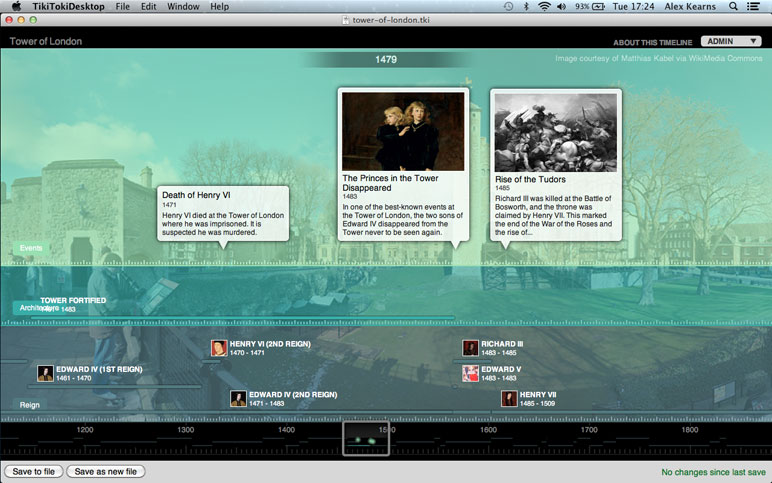
Online Interactive Timeline Maker!
Create beautiful timelines
Tiki-Toki is web-based software for creating beautiful interactive timelines that you can share on the Internet. (http://www.tiki-toki.com/)
- Nothing to download - Tiki-Toki works in your browser. Sign up for a free account and you can start creating a timeline.
- Stunning 3d timelines - No other online timeline maker allows you to view your timelines in 3D.
- Include images and videos - Tiki-Toki provides integration with not only text and images but YouTube and Vimeo for videos as well.
- Share timelines with anyone - Each timeline you create has its own unique url that you can send to teachers and friends.
- Colours and categories - Tiki-Toki allows you to create different categories for stories (events) and colour code them. Many customizable features in your timeline.
A creative tool for students to pull together multimedia with their research. I took a 5th grade student's PowerPoint, which was his culminating project for his research, and pulled out his research notes, images and added video to make the following interactive timeline. (This only has a few entries but it was quick, 10 minutes and very easy to do) http://www.tiki-toki.com/ timeline/entry/333303/The- Life-of-Jackie-Robinson/
This works great on the Chromebooks, too!
Maria
Maria E. Pearson
Instructional Technology Specialist
Winnisquam Regional School District
My Blog - http://wrsdtechnology. blogspot.com/
Subscribe to:
Posts (Atom)