Categories
Showing posts with label Apps. Show all posts
Tuesday, August 25, 2020
Sunday, January 22, 2017
Individualized work for differentiated learning in Google Classroom
Announcement from Google: https://blog.google/to pics/education/new-google-clas sroom-features-make-it-easier- learn-teach-manage-and-build/ includes differentiating assignments by student or groups of students in Google Classroom.
Maria E. Pearson
Instructional Technology Specialist
Winnisquam Regional School District
603.286.4531 x1211
My Blog - http://wrsdtechnology.blogspot.com/
Tuesday, August 25, 2015
New Features in Google Classroom...
As many of you know, WRSD is using Google Apps for Education in grades 1
through 12 this year. One of the easiest ways to introduce students to this
integrated environment is through the Google Classroom App. To go through
a tutorial on how to set up your virtual classroom in Google, go to
MPearson@wrsdsau59.org and I can help you get started.
To keep you up to date, I want to share some enhancements to Google
Classroom that were just released earlier this week.
|
|
Posted: 24 Aug 2015 11:51 AM PDT
As teachers gear up for the new school year, we’re adding a number of new features in
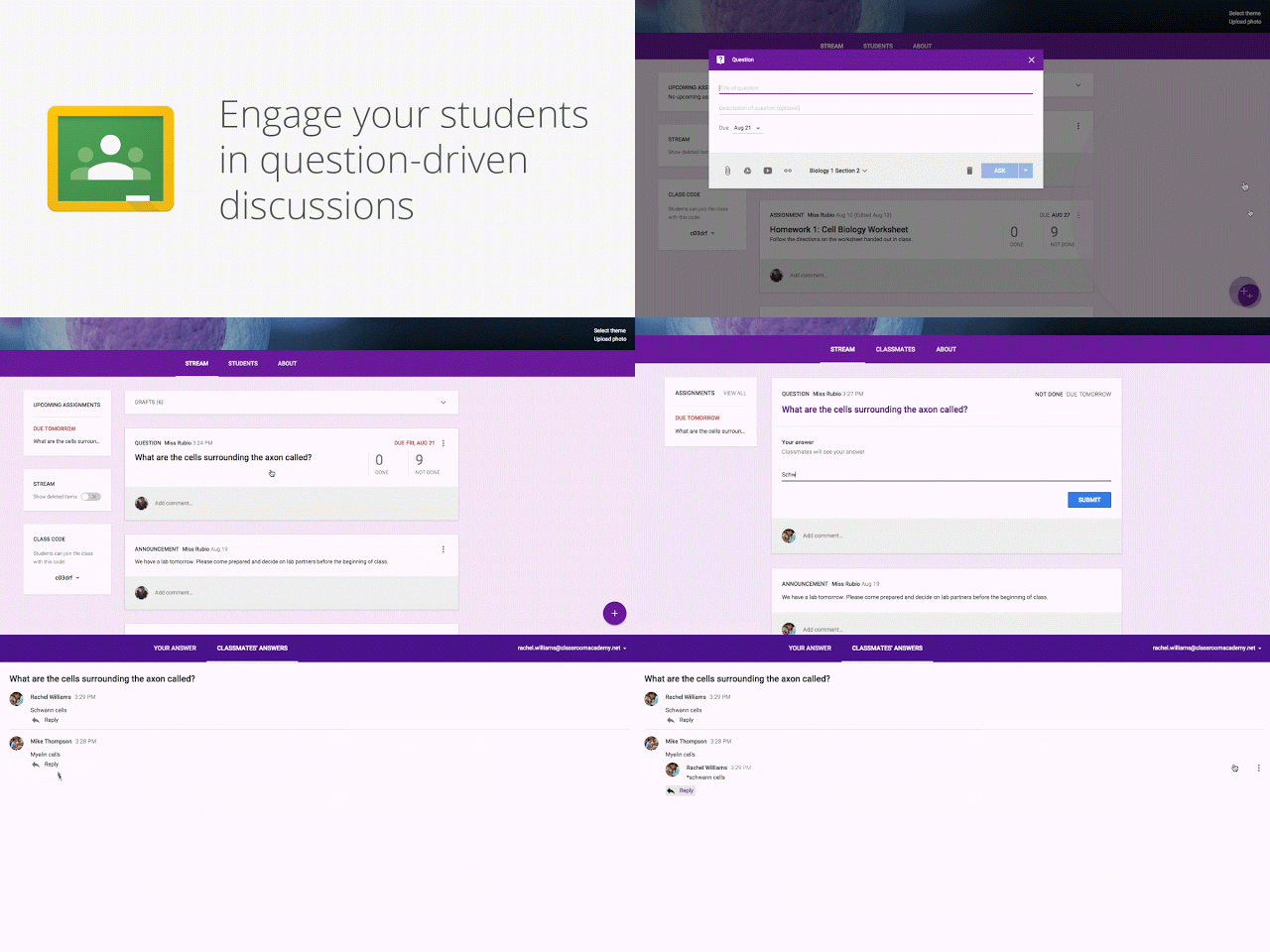
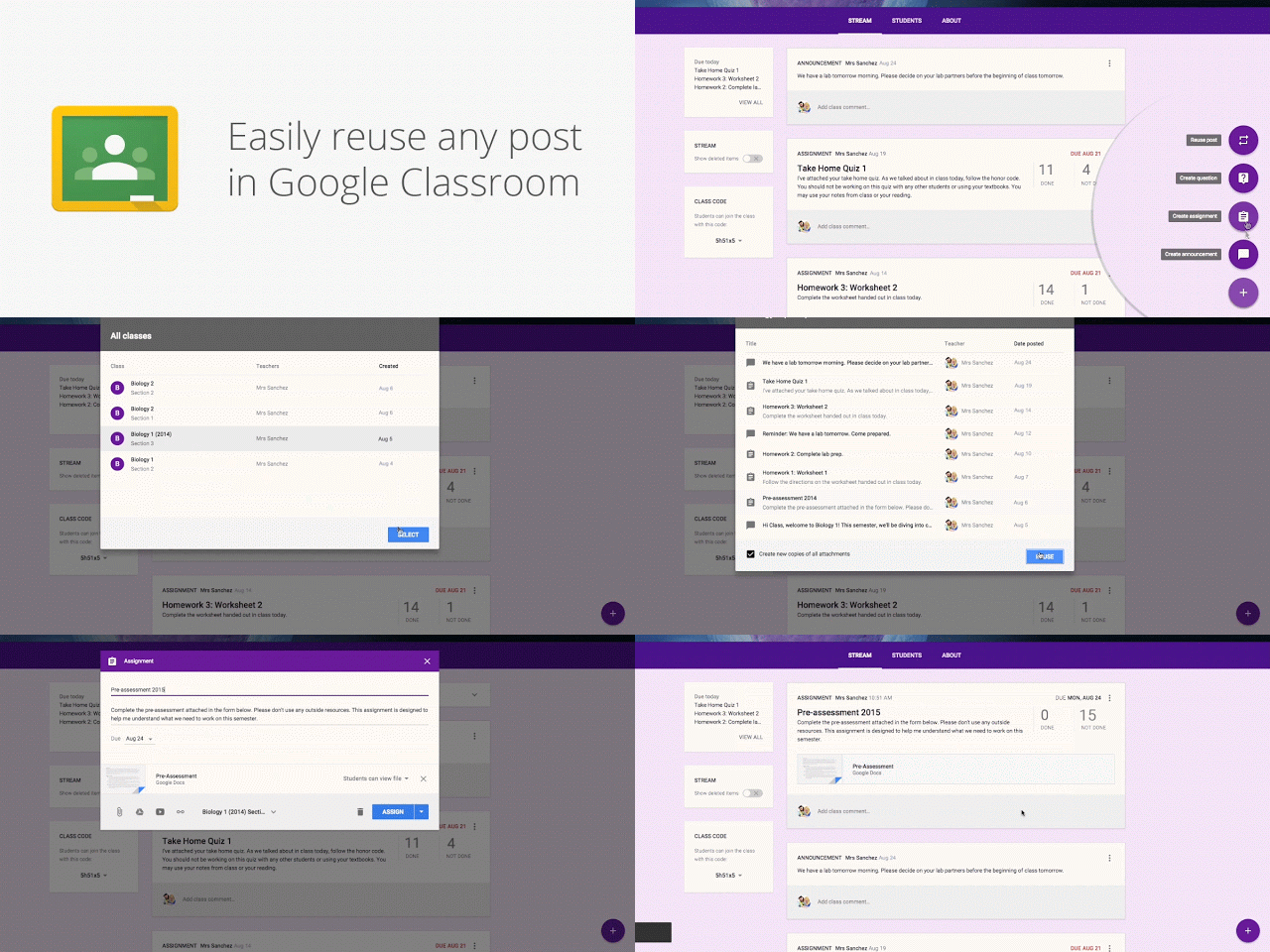
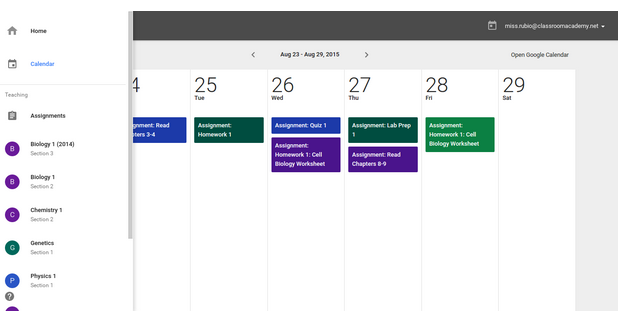
Google Classroom to help them save time, engage with students, and keep everyone organized. Most of these features are rolling out this week, with others coming soon. Keep students engaged with question-driven discussions Since Classroom launched last year, teachers have been using their class stream to host student debates, Q&A, and discussions. Starting today, they’ll be able to do this in a more collaborative way. They can post questions to their class and allow students to have discussions by responding to each other’s answers (or not, depending on the setting chosen). For example, teachers could post a video and ask students to answer a question about it, or post an article and ask them to write a paragraph in response. Teachers can now reuse assignments, announcements or questions from any one of their classes — or any class they co-teach, whether it’s from last year or last week. Once they choose what to copy, they’ll also be able to make changes before posting or assigning it. In the next month, Classroom will automatically create a calendar for each class in Google Calendar. All assignments with a due date will be automatically added to class calendars and kept up to date. Teachers will be able to view their calendar from within Classroom or on Google Calendar, where they can manually add class events like field trips or guest speakers. And a few more improvements based on teacher feedback:
|
Tuesday, July 28, 2015
EPIC! Online library of eBooks for kids 12 and under on the web, iOS, and Android devices
Epic! opens the doors to a new world of reading for kids 12 and under by providing an unlimited selection of eBooks that can be instantly discovered, read and shared with friends. Personalized for each individual reader, Epic! is the only place to access thousands of high quality, curated children's books without the need to purchase or download them one by one. Beautifully designed for mobile and featuring fun, game-like elements, Epic! provides kids with a personal library they can take anywhere. In a world of unlimited screen time, Epic! is a smart alternative to games and videos. Epic! is available on all iOS and Android devices. Go to https://www.getepic.com/ and get started today!
Thanks Trisha Kent from Union Sanborn for sharing this terrific resource!
Thursday, January 15, 2015
A Classroom mobile app and new desktop options for teachers...
Our next Tech Tuesday, January 20th at 2:45 to 4pm (WRMS Media Center Lab) will be on Google Classroom... Take 2, and will include these features. Go to My Learning Plan to enroll.
Posted: 14 Jan 2015 09:40 AM PST
Today we’re launching a native Classroom mobile app for both Android and iOS to help teachers and students be more collaborative in the classroom and save even more paper and time:
- Snap a photo: Right from the assignment page in the mobile app, students can snap a photo and attach it to their assignment.
- Share from other apps: Students can also easily attach images, PDFs and web pages from other apps to their assignments.
- Offline caching: Class streams and assignment information are automatically cached every time you open the app with an Internet connection, so that you can see them when you don’t have a connection.
- Teacher Assignments Page: On Classroom for desktop, we’re launching a teacher assignments page, where teachers will be able to get quick access to any assignment, see how many students are done and mark assignments as reviewed.
- Archive Classes: We also know that classes don’t go on forever —that’s why today we’re launching the ability to archive classes. Archiving a class will remove it from the home page and make it read-only — teachers and class members can still view valuable information in archived classes, but can’t make any changes or turn in assignments.
Hope to see you next week thanks,
Maria
Maria E. Pearson
Instructional Technology Specialist
Winnisquam Regional School District
My Blog - http://wrsdtechnology.blogsp ot.com/
More details on this announcement, go to http://googleforeducation.blogspot.com/2015/01/A-Classroom-mobile-app-and-new-teacher-goodies.html
Thursday, October 30, 2014
XtraMath.org... Online Math Facts Practice for ALL your students
Keep your students engaged and making progress on learning their math facts!

XtraMath.org is an AWESOME site to help students master their basic math facts... supports addition, subtraction, multiplication and division. Xtramath is very easy to use and is set up in such a way that your students can practice at school as well as at home! Brenda Lawrence, Southwick teacher, uses this website with her 4th grade class. From the teacher perspective, you have access to all of your students' progress records from both school AND home. It is a great way to watch each child's progress. The reports are easy to read and easy to access as well. Each week you will receive an email report showing how your kiddos are doing as well. Super cool! If you haven't tried this site out with your class, it comes HIGHLY recommended. You won't be disappointed!
Thanks Brenda for contributing!

Go to https://xtramath.org/ to get started online or there's also an App for XtraMath!
XtraMath.org is an AWESOME site to help students master their basic math facts... supports addition, subtraction, multiplication and division. Xtramath is very easy to use and is set up in such a way that your students can practice at school as well as at home! Brenda Lawrence, Southwick teacher, uses this website with her 4th grade class. From the teacher perspective, you have access to all of your students' progress records from both school AND home. It is a great way to watch each child's progress. The reports are easy to read and easy to access as well. Each week you will receive an email report showing how your kiddos are doing as well. Super cool! If you haven't tried this site out with your class, it comes HIGHLY recommended. You won't be disappointed!
Thanks Brenda for contributing!
Go to https://xtramath.org/ to get started online or there's also an App for XtraMath!
Maria
Maria E. Pearson
Instructional Technology Specialist
Winnisquam Regional School District
603.286.4531 x211
My Blog - http://wrsdtechnology.blogspot.com/
Sunday, April 6, 2014
A Video Guide to Using the Google Drive iPad App
This is a repost from Richard Byrne's blog, "'iPad Apps for Schools"
Last Friday I was asked if I could share instructions for teachers and students using the latest version of the Google Drive for iPad app. I’m in the process of organizing all of my screenshots into a PDF. In the meantime, I have the following video overview of how to use the basic features of Google Drive iPad. At the end of the video I offer a tip about using multiple sign-in on shared iPads.
A Video Guide to Using the Google Drive iPad App
Friday, February 28, 2014
Reflector...Mirror your iPad(s) on your computer and/or projector.
![]() |
| Mrs. Lawrence's Class, with a few students using iPads at their desks. |
![]() |
| Three iPad screens projected on whiteboard from the PC showing entire class three students working simultaneously. |
Mirror your iPad(s) on your computer and projector.
Reflector is an AirPlay receiver that allows you to wirelessly display your iPad or iPhone on your computer (and projector). Mirror your device on a big screen without wires or complicated setups. Play games, watch movies, demo apps or present on the big screen from your iPhone or iPad. With Reflector, everything you do on your mobile device is wirelessly streamed to your computer in real time!
AirPlay Mirroring is built
in to the device.
No extras needed.
Reflector turns your computer into an AirPlay receiver for
wireless mirroring and streaming. It uses technology that's
built in to your iPad, iPod or iPhone to display content. Under
the hood, it works much like an Apple TV. There's no
complicated set up or need for adapters and wires. Once
installed, simply connect your device and mirroring begins.
Most newer Apple devices support mirroring and work
with Reflector. Find a complete list of compatible devices here.
wireless mirroring and streaming. It uses technology that's
built in to your iPad, iPod or iPhone to display content. Under
the hood, it works much like an Apple TV. There's no
complicated set up or need for adapters and wires. Once
installed, simply connect your device and mirroring begins.
Most newer Apple devices support mirroring and work
with Reflector. Find a complete list of compatible devices here.
Friday, April 5, 2013
The Best of the Best for Learning: Apps, Games, and Websites
Since many of you are looking for new resources to use with your projectors and whiteboards, I wanted to share the article and link below:
Additionally, the website Common Sense Media (http://www.commonsensemedia. org/) let's you search for reviews on many other Apps, Websites, Videos, Software and Online Activities that can integrate technology into the classroom. You can search based on age appropriateness, learning potential, topic, skill, genre and more.
2013 ON for Learning Award Winners
Common Sense Media's ON for Learning Award is given to the very best in
kids' digital media. Recognized this year over 50 apps, games, and websites that received our highest rating for learning potential. To see this year's awards winners, click on the "ON" button -->
Additionally, the website Common Sense Media (http://www.commonsensemedia.
I will be reviewing several of these resources in the coming weeks, if you find one particularly useful to your specific class or curriculum, please share your thoughts and I will gladly pass it on!
Subscribe to:
Posts (Atom)