Monday, January 26, 2015

Tech Tip: Essential PC shortcuts you should know...

Repost from Windows Get Help...

I've always liked that Windows gives me multiple ways to perform popular tasks. Say you want to print something. You could go to the File menu and select the Print command, or you can press the Ctrl button and the letter P. Ctrl+P is just one example of a keyboard shortcut. Shortcuts combine two or more keys to do something special that neither key does alone.
I prefer to use shortcuts whenever possible. It’s kind of amazing how much time you can save by cutting out mouse clicks. Here are my top 20 shortcuts that you might not know about—but should.

Get to know the basics

There are certain shortcuts I use all day, every day. They work whether I’m doing stuff with photos, music, documents, or spreadsheets.
  • Copy a selected item: Ctrl+C
  • Cut a selected item: Ctrl+X
  • Paste a selected item: Ctrl+V
  • Undo an action: Ctrl+Z
  • Redo that thing I just undid: Ctrl+Y
  • Select everything: Ctrl+A
  • Print: Ctrl+P
  • Lock your PC or switch users
    Windows logo key Picture of the Windows logo key+L
    This shortcut locks your PC and instantly displays the login screen.  This is especially important if you will be leaving your classroom!

To see more shortcuts, go to 20 essential PC shortcuts

Maria
Maria E. Pearson
Instructional Technology Specialist
Winnisquam Regional School District
603.286.4531  x211

Thursday, January 15, 2015

A Classroom mobile app and new desktop options for teachers...

Our next Tech Tuesday, January 20th at 2:45 to 4pm (WRMS Media Center Lab) will be on Google Classroom... Take 2, and will include these features. Go to My Learning Plan to enroll.

Posted: 14 Jan 2015 09:40 AM PST
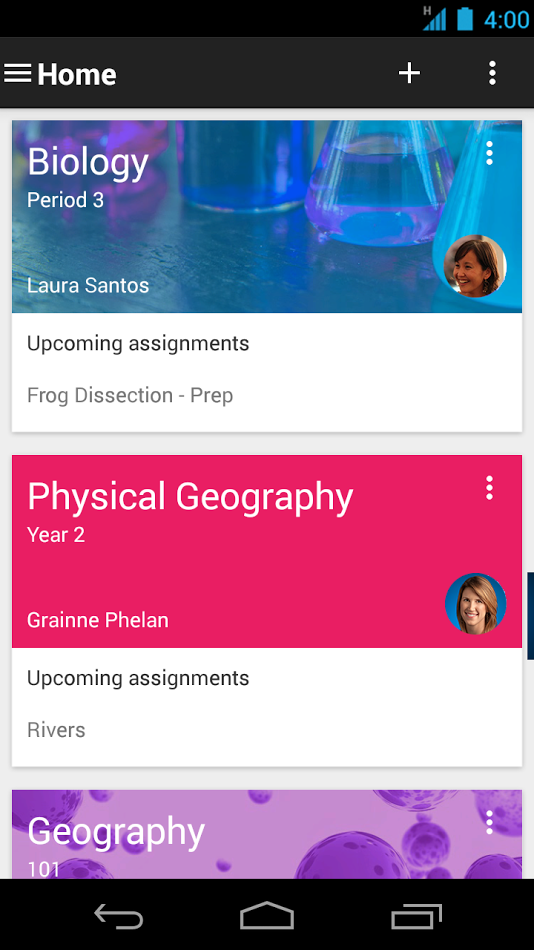
Today we’re launching a native Classroom mobile app for both Android and iOS to help teachers and students be more collaborative in the classroom and save even more paper and time:

classroom_android.png


New with the mobile app, students and teachers can:
  • Snap a photo: Right from the assignment page in the mobile app, students can snap a photo and attach it to their assignment.
  • Share from other apps: Students can also easily attach images, PDFs and web pages from other apps to their assignments. 
  • Offline caching: Class streams and assignment information are automatically cached every time you open the app with an Internet connection, so that you can see them when you don’t have a connection. 
We’re also launching two new desktop features to help teachers stay organized as they head into the second half of the year: 
  • Teacher Assignments Page: On Classroom for desktop, we’re launching a teacher assignments page, where teachers will be able to get quick access to any assignment, see how many students are done and mark assignments as reviewed.
  • Archive Classes: We also know that classes don’t go on forever —that’s why today we’re launching the ability to archive classes. Archiving a class will remove it from the home page and make it read-only — teachers and class members can still view valuable information in archived classes, but can’t make any changes or turn in assignments.

Hope to see you next week thanks,


Maria
Maria E. Pearson
Instructional Technology Specialist
Winnisquam Regional School District

Thursday, January 8, 2015

Indoor Recess Activities for all ages...

Yes, It's another day too cold to go outside!

Indoor recess is in full-swing with the new year, so I wanted to share a resource that our friends at Sanbornton Central School have been using to keep students active. GoNoodle.com is a website with tons of brain breaks, and it’s especially great this time of year when it’s hard to get outside. You can choose from a variety of activities (dancing, running in place, stretching, and lots more) for an active and controlled indoor recess.


Maria
Maria E. Pearson
Instructional Technology Specialist
Winnisquam Regional School District


INTRODUCING: 
Indoor Recess Mega Mixes!
New Indoor Recess Mega Mixes
Mega mixes are our most popular brain breaks, mixed together for longer GoNoodling sessions. Each mix takes the class through a warm-up, longer active session, and a cool-down at the end. Find all three under the new Indoor Recess Tag!
Indoor Recess 1: 12 Minute Mega Mix!>
Indoor Recess 2: 14 Minute Mega Mix!>
Indoor Recess 3: 15 Minute Mega Mix!>
Share your secret for staying active during the winter months by sending an email to school staff!
Share GoNoodle
You are receiving this
email because you opted in at our website, www.gonoodle.com.

GoNoodle · 209 10th Avenue South · Suite 350 · Nashville, TN 37203 · USA